
Posted on: March 9, 2026

This April, the library is rolling out several improvements that will enhance access to digital collections, support teaching and research and improve overall user experience. EBSCO eBooks will move to a more accessible DRM system that simplifies full‑book downloads. We are also introducing BiblioGraph, a visual discovery and linked‑data tool that strengthens the visibility and usability of curated library collections. In addition, the library website landing page will receive a refreshed design that improves clarity, accessibility and navigation. Together, these updates are part of our ongoing work to improve digital services for faculty, staff and students.
EBSCO eBooks Moving to a New, More Accessible DRM
Sometime in April, EBSCO will shift from Adobe Digital Rights Management to Readium LCP, a newer system that offers improved accessibility standards and a smoother download experience.
What is DRM?
Digital Rights Management controls how eBooks are accessed and shared. In a library context, DRM manages loan limits and protects licensing agreements.
Why the change?
Adobe Digital Editions, the software required for reading Adobe‑protected eBooks offline, is not compatible with many screen readers. This creates barriers under current accessibility standards. Readium LCP and the companion Thorium Reader support modern accessibility requirements and integrate better with assistive technology.
What will change?
Full‑book downloads will now be opened in Thorium Reader, not Adobe Digital Editions. The first time a user opens a downloaded book, they will enter a one‑time passphrase from EBSCO. A MyEBSCO account is still required for full downloads to support licence management.
The following remain unchanged:
• Online reading in the browser
• eBook searching
• Chapter downloads
• Access to DRM‑free titles
EBSCO has a demonstration video and support articles available for those who want a closer look.
What you need to do
If you or your students download full EBSCO eBooks for offline use, please install the free Thorium Reader.
BiblioGraph
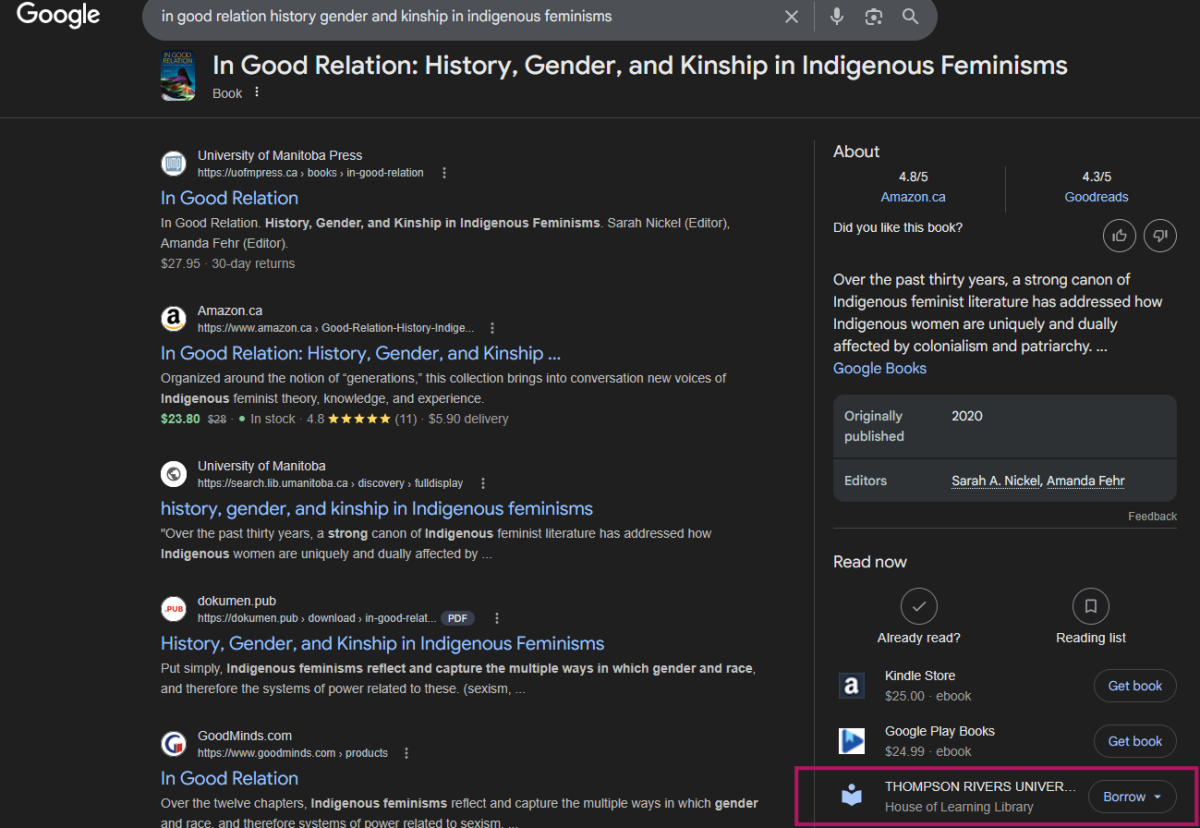
The Library has implemented BiblioGraph, an EBSCO tool that enhances the discovery of curated collections through visual browsing and linked data. It connects authors, topics and works, allowing users to explore relationships across materials more intuitively. BiblioGraph also transforms catalog records into linked data that can surface in platforms such as Google’s knowledge panels, significantly improving the visibility and reach of library resources.
You can see BiblioGraph in action through our Indigenous Awareness Week collection. Select “Explore Collection” to view titles in a visually rich, interactive format. We have also begun incorporating linked data into Google knowledge panels, expanding access pathways to library‑held content.
Library Website Update
Beginning in April, the library website’s landing page will adopt a refreshed layout and updated design. This redesign is informed by several years of user research and feedback from faculty, staff and students. It represents the first stage of a broader plan to update the entire library website.
The new landing page emphasizes:
• Improved accessibility
• A clearer, more intuitive layout
• A streamlined visual design aligned with TRU branding
Core functionality will remain the same, though some tools and links will move to more logical locations. Underlying pages will remain the same and existing bookmarks will continue to work.
We will share further updates and provide opportunities for feedback as we approach launch. Please stay tuned for more communications.
Feature photo: Photo by Lala Azizli on Unsplash reused under the Unsplash License.